Contact
 Login
Login


UVUtil Lite by Ft-lab
Installation
For Windows users:
Copy the UVUtil.dll (64bit version UVUtil64.dll) to "C\Users\username\Documents\Shade 3D ver.14\plugins" folder and start Shade 3D
(note that depending on your OS environment, the folder "my Document" might be in a different location)
For Mac OS users:
Copy the "UVUtil.shdplugin" folder to "/Users/username/Documents/Shade 3D ver.14/plugins" folder and start Shade 3D.
Installation note to upgrade from the Lite version to the paid version
The file for the Windows Lite version is "UVUtil_Lite.dll" (64bit version UVUtil_Lite64.dll), for Mac OS "UVUtil_Lite.shdplugin".
Since the Lite version and the paid version cannot coexist, you need to make sure (if the Lite version is already installed) to uninstall it prior to install the paid version.
Usage
In the following demonstration are described the steps needed to unwrap a model in order to avoid overlapping UVs using the "UV: Auto Unwrap" function.
1- Select a model/polygon mesh in the Shade 3D Browser. In this demonstration, the sample file "okitunesama_right.shd" provided with UVUtil_Lite is used.
Select the polygon mesh in the Browser.
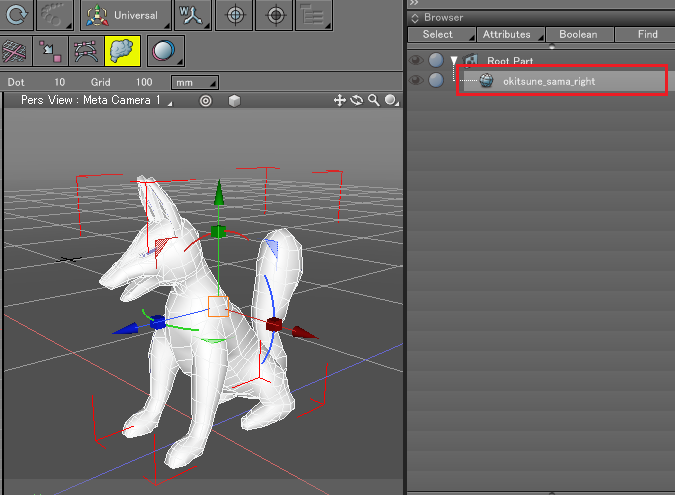
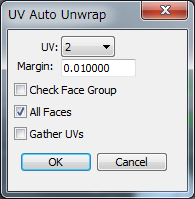
2 - In the "Attributes" menu of the Shade 3D Browser, select " UV: Auto Unwrap". The "UV: Auto Unwrap" dialog box will appear, press the OK button after making sure that "UV 2" is selected.
3 - The UV2 will be displayed in the "UV Edit" screen. You will see that the Auto Unwrapped surfaces are not overlapping each others.
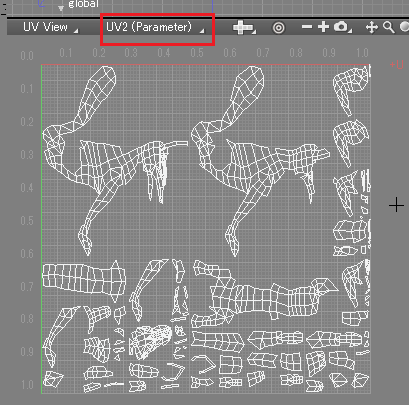
The largest surfaces will be displayed on the upper left side of the view, the smallest surfaces will be shown on the lower right corner.
It is now much easier to handle UVs when the user wants to perform actions such as 3D Paint or AO map.
This program also provides commands such as "UV Relayout" which rearranges UVs unwraped by LSCM or other methods, "Texture Baking" which combines textures in multiple mapping layers into a single layer, and other functions.
For more details, please refer to the documentation.